
Transitions - Right panel
Transitions panel view | Setting | Description / Setting selection |
|---|---|---|
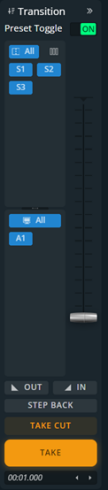 | Preset Toggle | Copy Program to Preview after the transition If Preset Toggle is enabled for a Screen, the layers in PGM replace the layers in PRW during a Take or Take Cut (“swap” effect). If Preset Toggle is disabled, the layers in PRW are copied to PGM and remain in PRW Screens during a Take or Take Cut. |
Panel size | Adjust the size of the Screens/ Aux selection panels and change number of columns by clicking on | |
Screen transition filter | Select the Screens and Aux affected by transition (by default, all Screens and all Aux are selected). Also indicated in the bottom bar. | |
Fade Out | Fade the selected screens to black | |
Fade In | Fade the selected screens to return from black | |
T-Bar | Transition the selection manually | |
Step Back | Revert the last change in layer settings. Does not work with a deletion. | |
Take Cut | Instant transition. Replace PGM layers with the PRW layers for the selected Screens with an immediate cut effect. The Global transition duration and the layers settings for Transitions, Speed and Timing are Not applied. | |
Take | Replace the PGM layers with the PRW layers for the selected Screens. Set the Global transition duration under the Take button (minutes:seconds.milliseconds). The layers settings for Transitions, Speed and Timing are applied to the Take. |
