
PGM and PRW buttons – Screen controls
Click the PGM or PRW button in any Screen to open options.⚓
Screen controls view | Setting | Description / Setting selection |
|---|---|---|
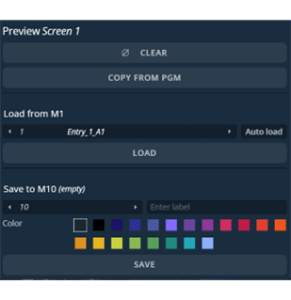 | Clear | Empty the layers content and keep other properties for this PGM or PRW Screen |
Copy from PGM | Copy layers settings from the corresponding PGM Screen (PRW only) | |
Load from | Load the Layer settings from a selected Screen Memory Enable auto load to display on Screen directly when selecting the Screen memory | |
Save to | Save the current Layer settings for this PGM or PRW Screen in a selected Screen memory | |
Label | Enter a label for the Master Memory. Select a color for the memory slot |