
Screen layout editor
Click  to open the layout editor, a smart tool to place layers in the Screen easily.
Layout editor view | Setting | Description / Setting selection |
|---|---|---|
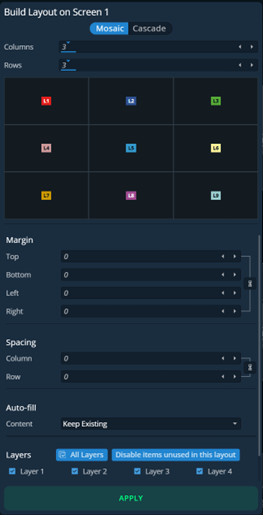 | Mode | Mosaic places layers in custom grid. Mosaic layout automatically arranges the layers in rows. The last slot is empty if the number of layers is odd. Cascade places all layers in cascade except Layer 1 in Fullscreen. |
Columns & Rows | Create a custom grid for the Mosaic mode | |
Margin | Reduce the area of this layout (ex: Top: 50% will ignore the top half of the Screen | |
Spacing | In Mosaic mode, set gaps between columns and/or rows | |
Autofill | Select the source content to put in layers | |
Layers | Select layers to include/exclude from this layout |
Note :
The layout editor is only available for Screens with layers.