
Sources - Left panel
The Sources are located in the left panel. Click the icons to show the corresponding sources:
Screen sources | |||
|---|---|---|---|
|
|
|
|


Note :
- Program Screens can only be used as content for Aux Screens and Split layers.
- Backgrounds can only be used in Background layers.
The following information are displayed per source content: - Source number - Source label - Source capacity - Resolution - The tallies turn red and green if the content is used in a
| 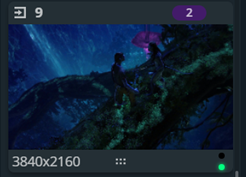 |


Example : Options⚓
On hover, click  in the top-right corner of a source thumbnail to open options (ex: Freeze an input, access the setup menu for the selected source or select an NDI source, if available).
Tip :
- Use the search bar at the bottom of the Sources panel to find a source or to display a batch of sources with the same char in the label.
- Click on the icon next to the search bar to downsize or expand the sources snapshots.