
Set Preview mode for Preview Screen widgets
In  Multiviewers⚓
Click
 Screens in the source panel.
Hover a Preview Screen and click
 to show preview options:
Preview Screen | Setting | Description / Setting selection |
|---|---|---|
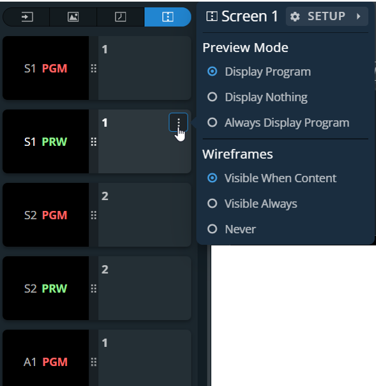 | Preview Mode | Select what is displayed in the Preview widget: - Display Program during transitions - Display Nothing during transitions - Always Display Program content in the Preview widget |
Wireframes | Select the visibility of the wireframes of the Preview Screen layers: - Layers wireframes displayed when content - Layers wireframes are always displayed - Layers wireframes are never displayed |
Tip :
It is possible to monitor both Program and Preview of a Screen in one Widget by using Always Display Program content and display Preview layers wireframe.