
Save a Master Memory from existing Screen Memories
Master Memory is made from Screen Memories therefore it is also possible to create a Master Memory by using existing Screen Memories.
In  Screens / Aux.⚓
Click the
 Memories tab in the right panel.
Select Master mode and click Save to open the Save Master Memory window:
Save Master Memory view
Setting
Description / Setting selection
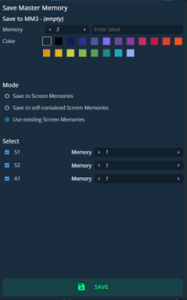
Save to
Select the Master Memory slot to use
Enter a label for the Master Memory
Select a color for the memory slot
Mode
Select Use existing Screen Memories
Select
Select the Screens and Aux Screens to include/exclude from the Master Memory
Select the Screen Memory slots to use in the corresponding Screens
Select the settings to save in the Master memory Memory using the table above.
Click Save.
Note :
Changing (and deleting) a Screen Memory also affects a Master Memory using it.
If needed, create a duplicate of the Screen Memory before making changes.