Save a Layer Memory
A Layer Memory saves the selected Layer in the current settings.
Using Filters, select which Layer settings to save in the Layer Memory. By default, all Layer settings are selected.
Note :
- If multiple layers are selected, the memory saves the layer settings of the Reference Layer. The Reference Layer is the first layer selected; it is indicated in the Properties tab.
- Master memories and Screen memories cannot point to Layer memories.
In  Screens / Aux.⚓
Click the
 Memories tab in the right panel.
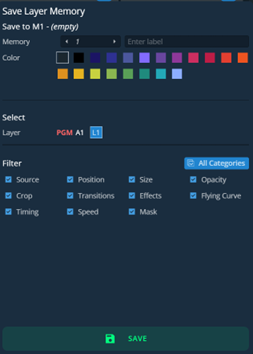
Select Layer mode and click Save to open the Save Layer Memory window:
Save LayerMemory view
Setting
Description / Setting selection
Save to
Select the Layer Memory slot to use
Enter a label for the Layer Memory
Select a color for the memory slot
Select
Shows the selected layer
Filter
Select the layer settings to include/exclude from the Layer Memory
Select the settings to save in the Layer Memory using the table above.
Click Save.