
Load a Configuration
In the top bar, click
 , then Load.
In the Load panel, select the slot to load.
Or
Drag and drop the configuration file from the computer file explorer to the upload area.
The configuration is extracted and conflicting settings are grayed out in the filters (version incompatibility, obsolete information, device logs, etc.).
In the filters, select the settings to load.
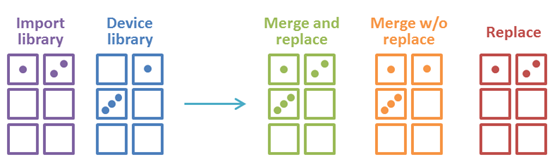
Select how to merge the images in the Library.
Merge and replace
Merge and replace images in non-empty slots
Merge without replacing
Merge but keep images in non-empty slots
Replace current Image Library
Replace the entire device library with the import library
Click Apply Device.
The configuration is loaded to the Web RCS and applied to the current configuration.