
RC400T synchronization
In the top bar, click
 or select the Virtual RC400T in the Live menu.
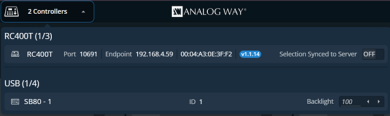
The sync statuses of the connected RC400T controllers are displayed.
Toggle Selection Synced to Server to enable / disable their synchronization to other control instances.
Note :
Program and Preview Screens that are protected by lock in the Web RCS cannot be modified by the RC400T when synchronized with server. Layers cannot be modified; Memories cannot be loaded but transition can be triggered.