
Save a Screen Memory
A Screen Memory saves the selected Screen in the current settings.
Using Filters, select which Layers and Layer settings to save in the Screen Memory. By default, all Layers and all Layer settings are selected.
In  Screens / Aux.⚓
Click the
 Memories tab in the right panel.
Select Screen mode.
Click Save to open the Save Screen Memory window:
Save Screen Memory view
Setting
Description / Setting selection
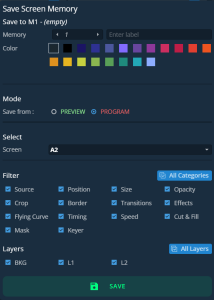
Save to
Select the Screen Memory slot to use
Enter a label for the Screen Memory
Select a color for the memory slot
Mode
Select to save the current layers settings from Program or Preview Screen
Select
Select the Screen to save
Filter
Select the layer settings to include/exclude from the Screen Memory
Select the layer to include/exclude from the Screen Memory
Select the settings to save in the Screen Memory using the table above.
Click Save.
