
Set GPIO in the Web RCS
In  GPIO⚓
GPIO⚓
- Set the GPI and GPO actions.
GPI actions⚓

Setting name | Description / Setting selection |
|---|---|
Polarity | Set when the GPI connector is active (when powered or when unpowered) |
Mode | Select No action to disable triggers from this GPI Select Take and associate a Screen to trigger the transition when using the GPI |
Take | In Take mode, select the Screen to take when triggering the GPI |
State | Check if the GPI is currently On or Off |
GPO actions⚓
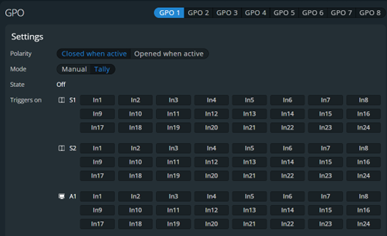
Setting name | Description / Setting selection |
|---|---|
Polarity | Set the GPO connector status when active (Closed or Opened) |
Mode | In Manual mode, the state can be defined by a user action through the Web RCS or by an automation controller In Tally mode, the tally level will change when a defined input is used in a Screen |
Screen X (one line per enabled Screen in Tally mode) | Set the association of Input-Screen for Tally mode Select one input per Screen to return in the tally |
State | In Manual mode, set if the GPO is currently On or Off In Tally mode, check if the GPO is currently On or Off |